Use Command line Parameters
ARTOS support short and long convention of command line parameters. Supported commands are listed below:
| Short | Long | Description |
|---|---|---|
| -c | –contributors | Prints ARTOS contributors name |
| -h | –help | Command line help |
| -p <arg> | –profile <arg> | Framework configuration profile name |
| -t <arg> | –testscript <arg> | Test script file path |
| -v | –version | ARTOS’ version |
Example 1: Run from compiled classes
// long convention
java -cp ".\lib\*;.\bin\" MasterRunner --testscript="testscript.xml" --profile="dev"

// short convention
java -cp ".\lib\*;.\bin\" MasterRunner -t="testscript.xml" -p="dev"
Example 2: Run from Jar
// long convention
java -jar .\lib\testproject.jar --testscript="testscript.xml" --profile="dev"

// short convention
java -jar .\lib\testproject.jar -t="testscript.xml" -p="dev"
Above examples are created using below project structure:
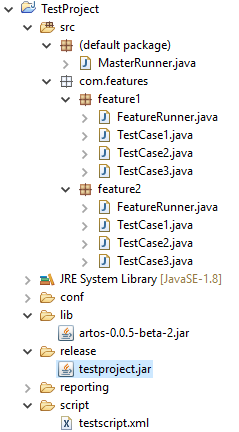
- Project compiled classes are located inside
bindirectory. - Project dependency Jars are located inside
libdirectory. - Project test script is located inside
scriptdirectory. - Project exported as JAR inside directory
release. - Project jar name =
testproject.jar - Project Master Runner class name =
MasterRunner. - Project Test Script name =
testscript.xml. - Project framework_config.xml profile =
dev.
>>> Project Jar manifest was created using following information:
Manifest-version: 1.0
Created-By: 1.0 (ARTOS Team)
Main-Class: MasterRunner
Class-Path: ../lib/artos-0.0.5-beta-2.jar